 Agents HQ
Short version: go to aistudio.google.com/apikey, sign in with a Google account, click Create API key, then copy the key and paste it into your app. No card is needed for the free tier.
What you need
- Any Google account (a regular Gmail account works).
- A web browser. Google AI Studio is the free website where Google hands out Gemini API keys.
- About two minutes.
An API key is different from the Gemini app or a Google AI subscription. The key is for software that talks to Gemini on your behalf. Paying for the Gemini app doesn't turn on paid API usage, and you don't need it for a free key.
Step 1: Open Google AI Studio
Go to aistudio.google.com/apikey and sign in with your Google account. The first time, Google may ask you to accept its terms. Google AI Studio isn't available in every country; if the page says it's not available where you are, the free key won't work there.
Step 2: Click "Create API key"
On the API keys page, click Create API key. If Google asks which project to use, pick Create API key in new project. You don't need to set anything else up.
Step 3: Copy the key
Your new key appears as a long code. Click Copy next to it. Treat it like a password: anyone with the key can use your Gemini allowance. You can come back to the same page any time to copy it again or delete it.
Step 4: Paste it into Agents HQ
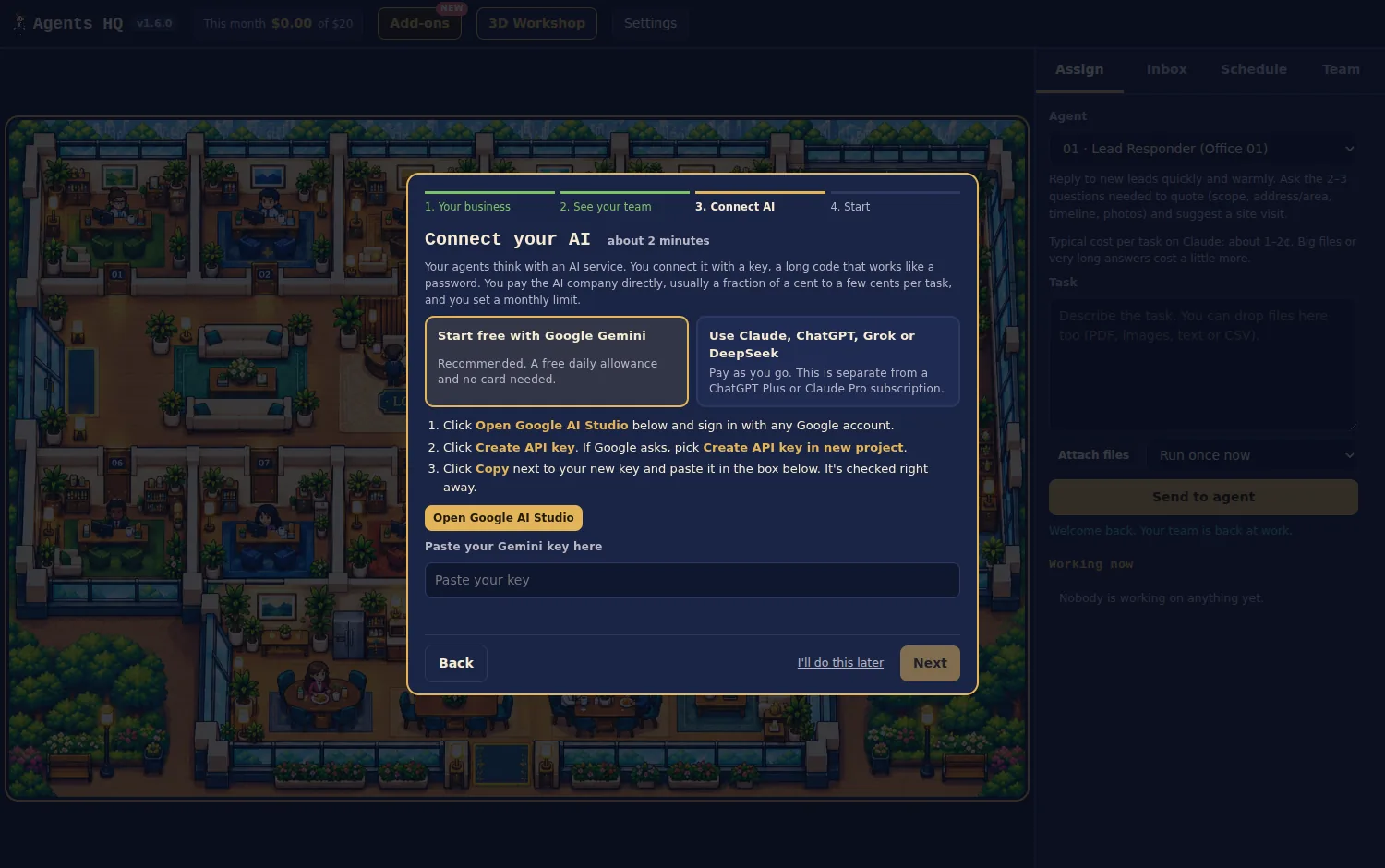
During setup, Agents HQ shows a Connect your AI step:
- Choose Start free with Google Gemini. It's the recommended option.
- Click Open Google AI Studio if you haven't made a key yet, and follow steps 1 to 3 above.
- Paste your key in the box. It's checked right away.
- Click Next, and your team gets to work on its first assignment.
What the free tier includes
Google's free tier for the Gemini API gives you a daily allowance of requests on its Flash models at no cost, with no card needed. A few things to know:
- Limits are set by Google and change. The number of requests per minute and per day depends on the model and on Google's current policy. Check the rate limits page in Google AI Studio for today's numbers.
- When you hit the daily limit, requests fail until the limit resets. You can wait, or turn on billing in Google AI Studio to keep going at Google's paid rates.
- Pro models and pictures need billing. In Agents HQ, a free key works with Gemini Flash, the default. Gemini Pro models and image generation need billing turned on in AI Studio.
- Privacy: Google may use free-tier requests to improve its products. If that matters for your business, turn on billing or use a paid provider for sensitive work.
If your key doesn't work
- Copy it again with the Copy button. A missing character or an extra space is the usual cause.
- Make sure you copied an API key from AI Studio, not a project ID or a password.
- If the key worked before and stopped, you may have reached the free daily limit. Try again later.
- If you deleted the key in AI Studio, create a new one and paste it in again.
Using Gemini with Agents HQ
Agents HQ is a Windows app with 16 AI agents for small businesses: lead replies, quotes, follow-ups, listings, posts and research. Gemini can also search the web for research agents, read images and build 3D models. You can add Claude, ChatGPT, Grok or DeepSeek later and put each agent on a different AI. Not sure which business setup fits? See AI agents for small business, or the pages for contractors and 3D printing.